
DNP DS-RX1HS: The Commercial Photobooth Printer Standard Explained
Why the DNP DS-RX1HS is the default printer for commercial photobooth operators. Print speed, media cost, RX1HS vs 620A, and what to know before buying one.
DIY KIT
Mace - Founder and Fabricator
3/22/20265 min read
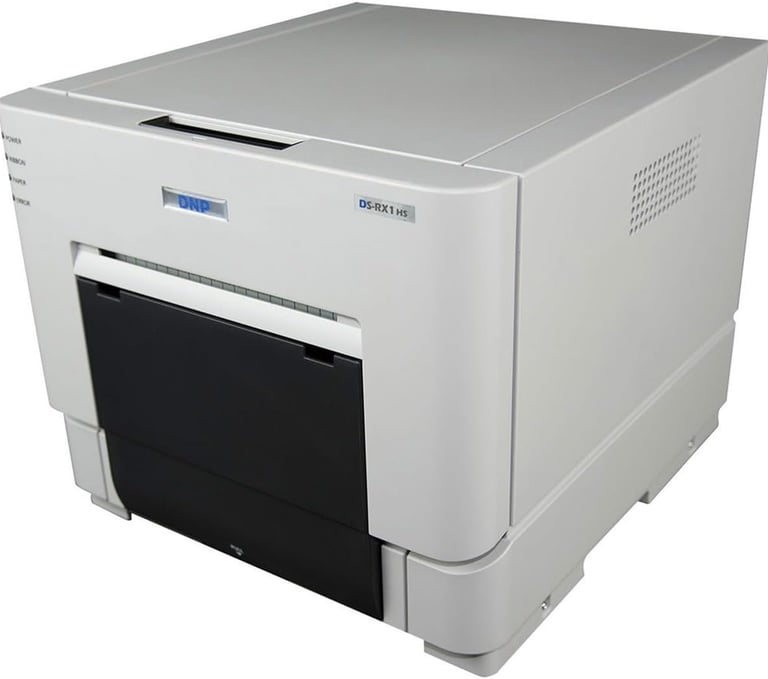
DNP DS-RX1HS: The Commercial Photobooth Printer Standard Explained
Ask a room full of photobooth operators what printer they run and most of them will say the same thing. The DNP DS-RX1HS is not the flashiest piece of hardware in the industry and it is not the cheapest. It is the one that keeps working.
This post covers what makes it the default choice, how the media cost math works, and when the smaller DS-620A makes more sense.
Why inkjet is the wrong answer
Before getting into the DNP specifically, it is worth being clear on why inkjet printers are not used in commercial photobooths.
Inkjet prints are wet when they come out of the printer. They need time to dry before they can be handled. At a busy booth running sessions back to back, guests reach for their print immediately. A wet inkjet strip smears on contact and the guest walks away with a ruined keepsake and a bad impression of the booth.
Inkjet media also degrades faster in humid or warm environments. A booth running at a summer festival or in a venue without good climate control will see print quality drop and paper feed issues increase.
The media cost per print on inkjet looks cheaper upfront but falls apart at volume once you factor in wasted prints from jams, quality failures, and the replacement media those events require.
Dye sublimation is the only modern technology that makes sense for a commercial photobooth.
How dye sublimation works and why it matters
Dye sublimation transfers dye directly into the paper surface using heat. The dye becomes part of the paper rather than sitting on top of it. An overcoat layer is applied on the final pass.
The result is a print that comes out of the printer completely dry and immediately handleable. No waiting, no smearing. The overcoat makes it resistant to fingerprints, water, and humidity. Prints from a dye-sub printer will outlast inkjet prints by a significant margin under the same storage conditions.
Print speed is also competitive. The DS-RX1HS produces a 4x6" print in 12.4 seconds and can sustain 290 prints per hour. At a busy event running sessions every 30 to 60 seconds, the printer keeps up without creating a queue backup.
The DS-RX1HS specifically
The DS-RX1HS is DNP's workhorse for photobooth and high-volume event printing. The HS stands for High Speed. The original RX1 is the predecessor, slower at around 15 seconds per 4x6" print versus 12.4 on the HS, and discontinued. Used RX1 units show up at lower prices and are a reasonable budget option as long as the firmware has been updated to version 2.04 or later, which is required for media compatibility. For a new build, buy the HS.
It supports 4x6", 2x6" photo strips, 5x7", and 6x8" print sizes from the same printer. Most photobooth operators run it in 2x6" strip mode, which produces two strips per session. The alternative is a single 4x6" print per session.
The hardware is built for continuous operation. It is designed for retail kiosks, event printing stations, and photo booths specifically. This is not a desktop printer repurposed for booth use. It is the purpose-built option.
RX1HS vs DS-620A: which one to buy
The DS-620A is DNP's smaller, lighter printer. It is popular with event rental operators who are loading and unloading equipment from a vehicle multiple times a week. Portability is its main advantage.
For a permanent unattended venue booth, the RX1HS wins on every dimension that matters.
Media capacity: The RX1HS holds 700 prints per roll. The 620A holds 400. For an unattended booth you are not checking daily, the RX1HS means fewer reloads and less chance of running dry between service visits.
Media cost per print: RX1HS media runs approximately $0.14 per 4x6" print. DS-620A media runs approximately $0.22 per print. At 1,000 prints a month that difference is $80. At 5,000 prints a month it is $400.
Media supply reliability: DS-620A media has experienced periodic supply shortages. RX1HS media supply has been more consistent. For a business generating revenue from print sales, a media shortage means a booth that cannot print.
The 620A case: If you are running an event rental business and carrying the printer to and from events in a bag, the 620A's smaller size and weight matters. It is a good printer for that use case. For a permanent installation, it is the wrong trade.
Media cost math
At $0.14 per print on the RX1HS, the consumable cost is low enough to run a profitable pay-per-print operation even at low price points.
A pay-per-print booth charging $2 per session with a print cost of $0.14 keeps $1.86 on every session before accounting for the other costs and venue split.
For event rental operators charging $350 per hour, the media cost is essentially invisible as a line item. At 200 sessions over a 4-hour event that is $28 in consumables against a $1,400 booking.
The printer hardware cost recovers quickly. At 1,000 sessions per month the media cost is around $140. At that volume a $1,000 printer pays for itself in saved media costs versus a higher cost-per-print alternative within a few months.
Media storage: where operators quietly cause their own problems
Dye-sub media is sensitive to storage conditions. Heat, humidity, and direct sunlight degrade the ribbon and paper before they are ever loaded into the printer.
Degraded media causes ribbon tears, paper jams, and reduced print quality. These problems look like printer problems. They are usually storage problems.
The rules are simple: keep media in its original packaging until loading, store it at room temperature, keep it out of direct sunlight, and do not leave it in a vehicle in warm weather. If your booth is in a venue that gets hot, store the spare media outside the booth enclosure.
A B&H product listing notes that DS-620A media performance is maintained after 18 months of storage at under 25 degrees Celsius and under 65% relative humidity. Above those thresholds, degradation starts. The RX1HS media follows the same principles.
If you are seeing ribbon tears or paper jams on a printer that was working fine, check when and where the media was stored before looking at the printer itself.
DNP vs the alternatives
Citizen and Mitsubishi both make dye-sub printers used in photobooth applications. Neither is wrong. The reason DNP is the default for most operators comes down to a few practical factors.
Parts and media are widely stocked. B&H, Adorama, and most specialty photobooth suppliers carry DNP media. If you run out or need a replacement, sourcing is straightforward.
Third-party software support is broad. DSLR Remote Pro, the industry standard for permanent booth deployments, has well-tested DNP drivers. Setup is documented and supported.
The operator community is large. If you have a problem with a DNP printer, someone on a photobooth forum has had it before and documented the fix. That community knowledge has real value when you are troubleshooting a booth at midnight.
Citizen and Mitsubishi printers are used by professionals who prefer them for specific reasons. For a first build or a permanent venue installation, DNP is the lower-risk choice.
What to know before buying
The DS-RX1HS and its predecessor the RX1 use the same media. If you find a deal on a used RX1, the media is compatible as long as the firmware has been updated to version 2.04 or later.
Media kits include both the paper roll and the ribbon. They are matched and sold together. Do not mix paper and ribbon from different batches or manufacturers.
The printer is not included in the Bhoto Booth kit. Source it separately. B&H Photo is the most reliable retailer for both the printer and ongoing media supply.
One more thing
The printer is one piece of the build. Sourcing, wiring, and configuring everything around it is where most builds stall or fail. The compute, the lighting, the payment system, the software, the automation that keeps it all running without anyone on site.
That is what the DIY Photobooth kit solves. I have been running this hardware in permanent venues and at events for years. You do not have to figure it out from scratch.
-Mace
Connect
Get in touch for bookings or questions
info@bhotobooth.com
510-603-6019
© 2026. All rights reserved.
Located in: San Francisco, CA
Proudly serving San Francisco, Oakland, Berkeley, San Jose, Silicon Valley, Marin County and more.
@thebhotobooth